
Hosting the GS1 trust chain
Global Office and Member Organisations can run this wallet in more than one way. The license chain does not change. What changes is who operates the wallet. When a user secret protects a key, the organisation named by the identifier still provides that second factor before the private key signs.
How to read these scenarios
Every later diagram uses the same three questions. Keeping them apart is what makes a custodial wallet understandable.
- Authority. The organisation the identifier names. That organisation decides what may be signed in its name. Global Office, each Member Organisation, and each member company each has its own decentralised identifier (DID).
- Custody. Who runs the wallet, and therefore where the private keys are stored. The cryptographic private key stays in the wallet’s key module. When a user secret protects the key, that file is a second factor the user keeps, and the operator uses the private key only when the user provides it. Scenarios 2 and 3B work this way. Scenario 3C is the exception: the member company has no login of its own, so a user secret on its keys would be handed from the company to the Member Organisation and then presented on the Global Office wallet.
- Publication. Which domain serves the DID document. The domain is part of the identifier (
did:web:DOMAIN). GS1 Global Office’s root identifier isdid:web:vc.gs1.org, already published at https://vc.gs1.org/.well-known/did.json. How did:web works summarises the method.
A hosted identifier can also use a path on the operator’s domain. did:web:vc.gs1.org:mo:swiss resolves to https://vc.gs1.org/mo/swiss/did.json, still on the Global Office domain. Member Organisations will normally forward their own domain so the identifier reads, for example, did:web:vc.gs1.ch. A path on the host’s domain is the form that matters for member-company identifiers in scenario 2 and scenario 3. The choice is set out under Publishing an identifier on your own domain. Publication does not move the private keys.
In the clearest setup, authority and custody are the same party. A custodial wallet splits them: the operator stores keys for organisations that remain the authority. With a user secret, control of the private key stays with the user.
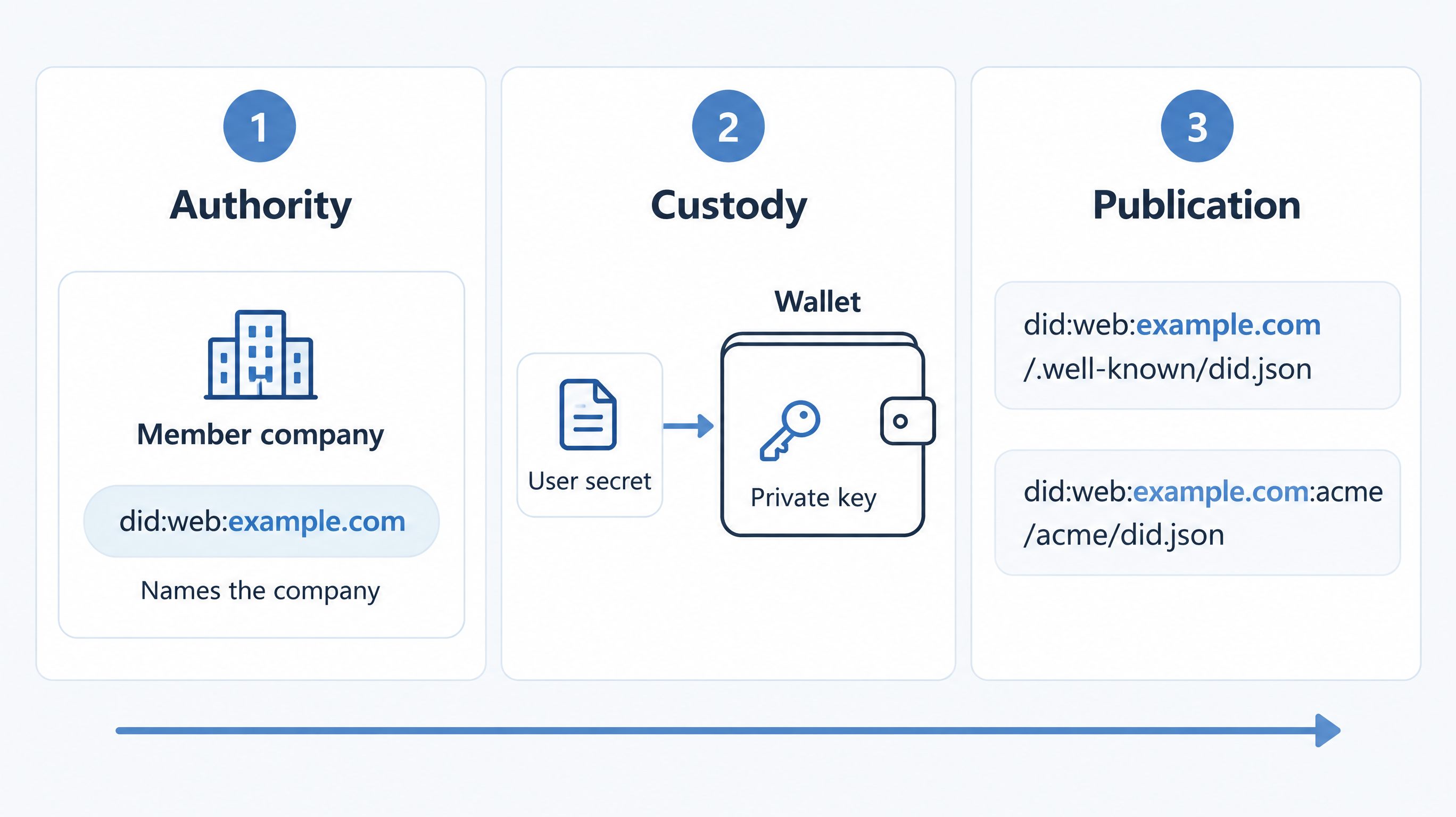
did:web:DOMAIN. Verifiers download the DID document from that domain. A hosting decision changes custody, and sometimes which domain appears in the identifier. It does not change which organisation the identifier names.The GS1 trust chain
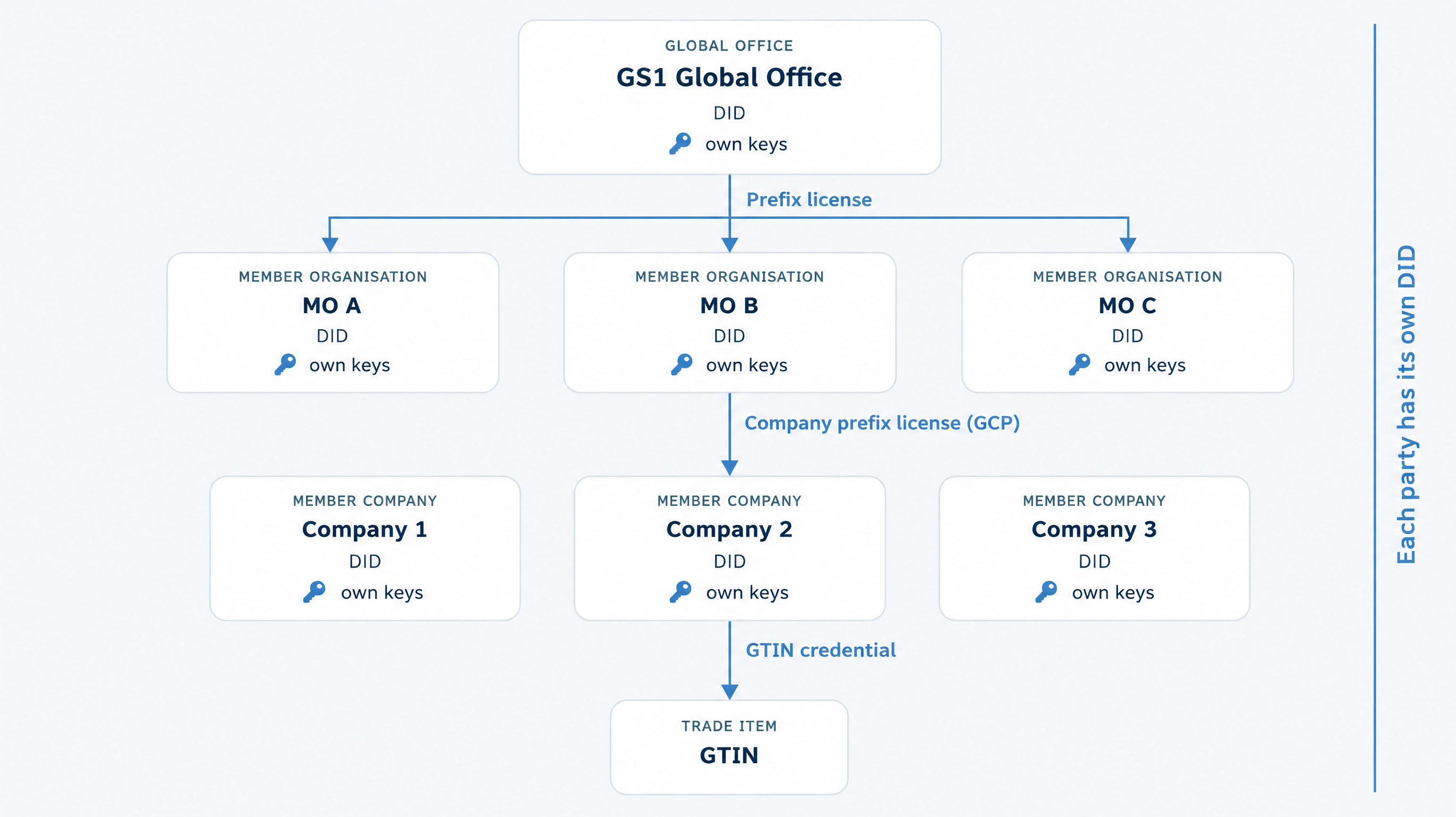
GS1 Global Office is the root of trust. From there the chain is always the same, whichever scenario you choose:
- Global Office has its own DID. It issues a prefix license to a Member Organisation.
- Each Member Organisation has its own DID. It issues a company prefix license (a GS1 company prefix, GCP) to a member company.
- Each member company has its own DID. It issues GTIN credentials for its trade items.
A verifier follows that chain from the trade item back to Global Office. The scenarios below only change where the wallets run.
Scenario 1 — Each party runs its own wallet
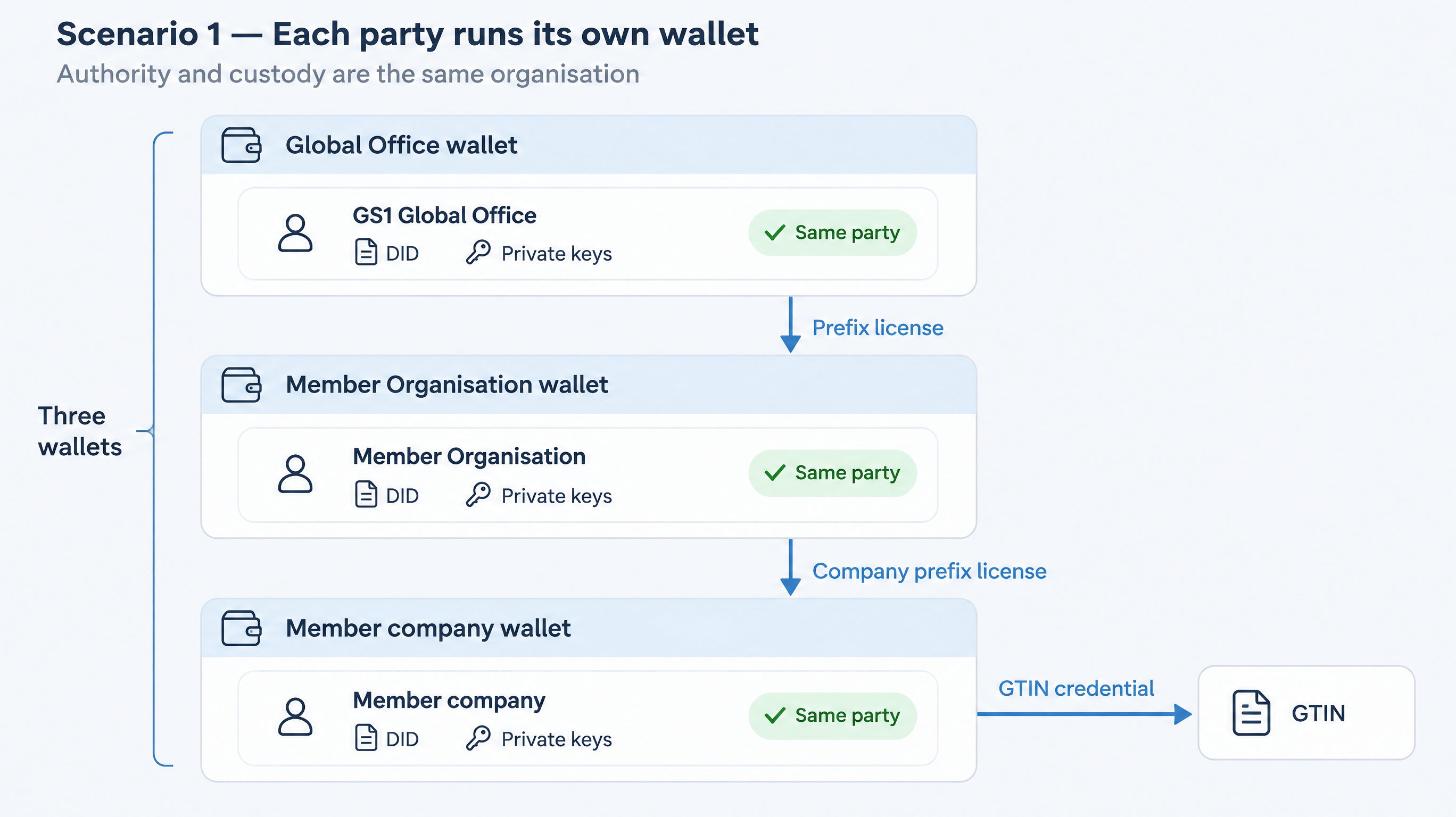
This is the clearest setup, and the long-term target. Global Office, every Member Organisation, and every member company runs its own wallet.
The party that the DID names is the same party that administers the wallet and holds the private keys for the public keys in the DID document. There is no hosting organisation that could sign on someone else’s behalf.
- Global Office issues prefix licenses from its own wallet.
- The Member Organisation issues company prefix licenses from its own wallet.
- The member company issues GTIN credentials from its own wallet.
- Each party signs in through its own accounts.
Almost no one in this chain has a wallet yet. Scenarios 2 and 3 are how the technology is introduced step by step, while the use cases work from the start. A Member Organisation, or Global Office, hosts identifiers for parties that do not yet run a wallet. Those parties can issue and receive licenses immediately, and take on their own wallet later. Scenario 1 stays the long-term target.
Scenario 2 — A Member Organisation hosts its companies
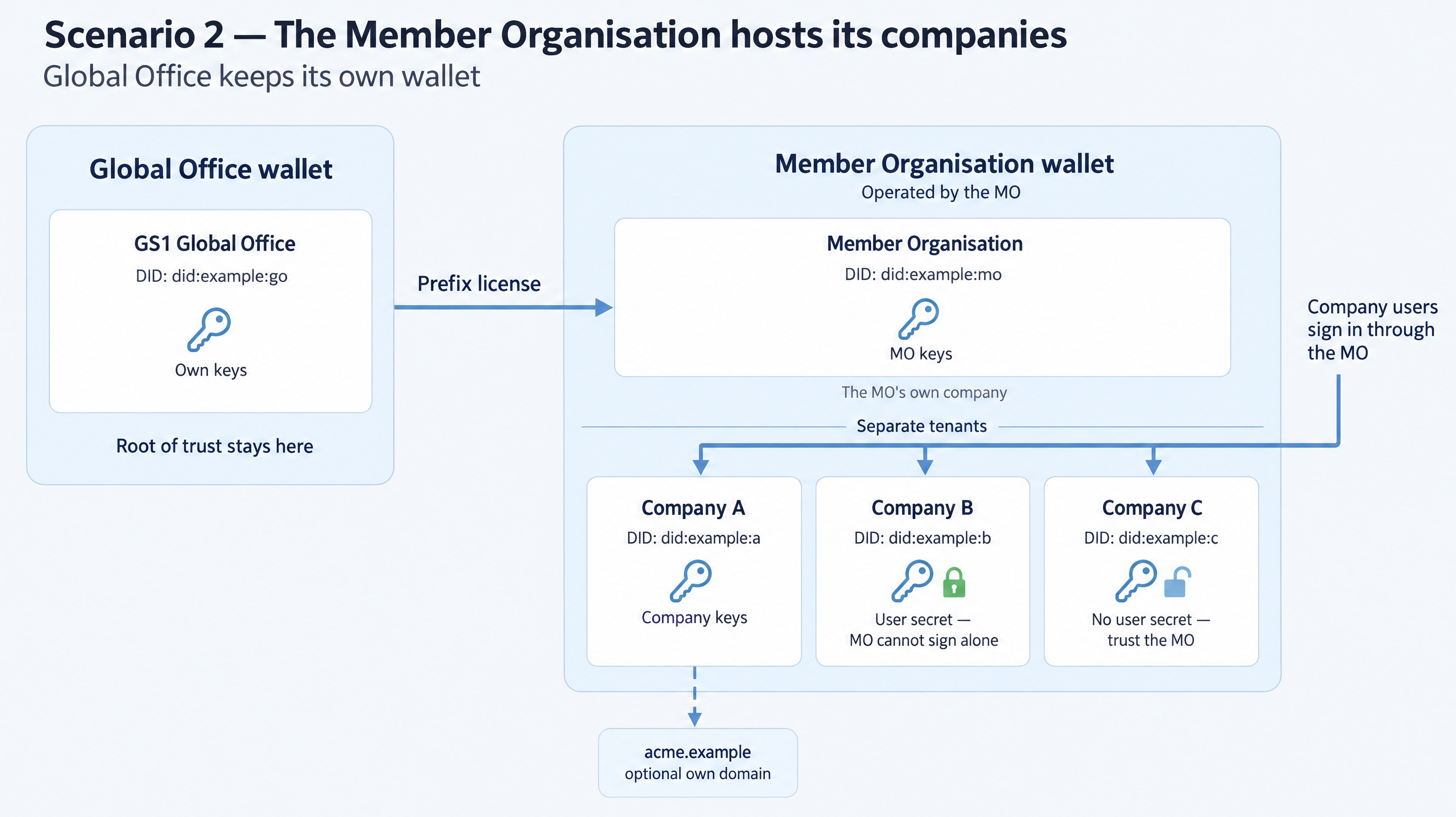
This is the next-best setup. Global Office still runs its own wallet, so the root of trust stays with Global Office. Each Member Organisation offers one wallet to its member companies.
Inside the Member Organisation’s wallet:
- The Member Organisation’s own DID and keys sit in the Member Organisation’s company.
- Each member company’s DID and keys sit in that company’s own tenant — a separate company record in the same wallet.
- The member company remains the authority for its DID. The Member Organisation operates the wallet: hosting, backups, and publishing.
How member companies reach the wallet is up to the Member Organisation. They may sign in through the Member Organisation’s single sign-on. The Member Organisation may also offer the same functions inside screens it already gives its companies, by calling the wallet API. In both cases the company’s identifiers stay in that company’s own tenant.
Give the wallet-wide administrator role only to the Member Organisation. That role can open every company in the wallet. People at a member company should receive a company administrator role for their own company only. See roles.
What the operator can do with a hosted key
- With a user secret. The member company keeps the key file. That file is a second factor, the same idea as the extra confirmation a banking app asks for. The wallet does not store it, and the cryptographic private key never leaves the wallet’s key module. The Member Organisation uses the private key when the company provides the file. See user secrets.
- Without a user secret. The company’s login and the wallet’s service secret are enough to use the key. The company authorises the Member Organisation to sign when the company has asked for it.
A user secret keeps technical control of the private key with the company, while the Member Organisation operates the wallet. The same split holds in scenario 3B. Scenario 3C is the case where it does not.
Publishing an identifier on your own domain
A did:web identifier includes the domain that serves it. Verifiers fetch the DID document from that domain. The wallet can publish the document on the operator’s domain, under a path for the hosted party. The hosted party can instead serve the same document on its own domain. The private keys stay in the operator’s wallet either way. The resolution rules are in how did:web works.
- Operator path. The host publishes the party at a path on the host’s domain.
did:web:vc.gs1.org:mo:swissresolves tohttps://vc.gs1.org/mo/swiss/did.json. The same pattern is how a Member Organisation publishes a member company, for exampledid:web:mo.example:companies:acmeresolving tohttps://mo.example/companies/acme/did.json. This is the usual form for member-company identifiers in scenarios 2 and 3. - Own domain. The organisation uses its own domain, for example
did:web:vc.gs1.chordid:web:acme.example. That domain answers athttps://vc.gs1.ch/.well-known/did.json, either by forwarding to the wallet or by storing a copy of the DID document. The company record in the wallet lists that domain so the identifier can be created there. Member Organisations will normally choose this, so the identifier is theirs even when Global Office hosts the wallet.
A path on the Global Office domain is enough to publish a hosted party immediately. An own domain is the same DID document at an address the organisation controls. Neither choice moves the private key.
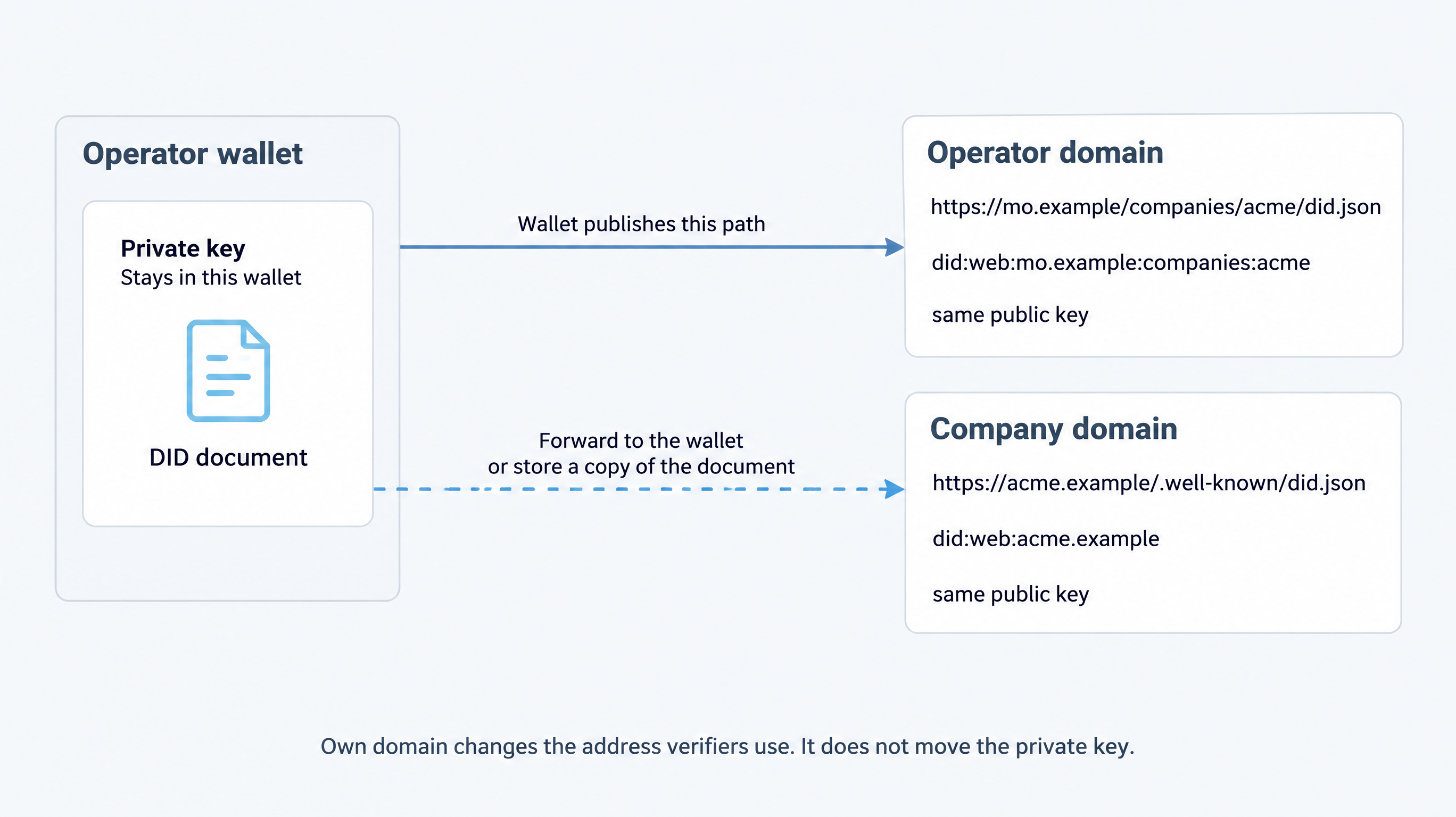
did:web means the organisation’s website serves the DID document. It does not move the private key.Scenario 3 — Global Office runs the only wallet
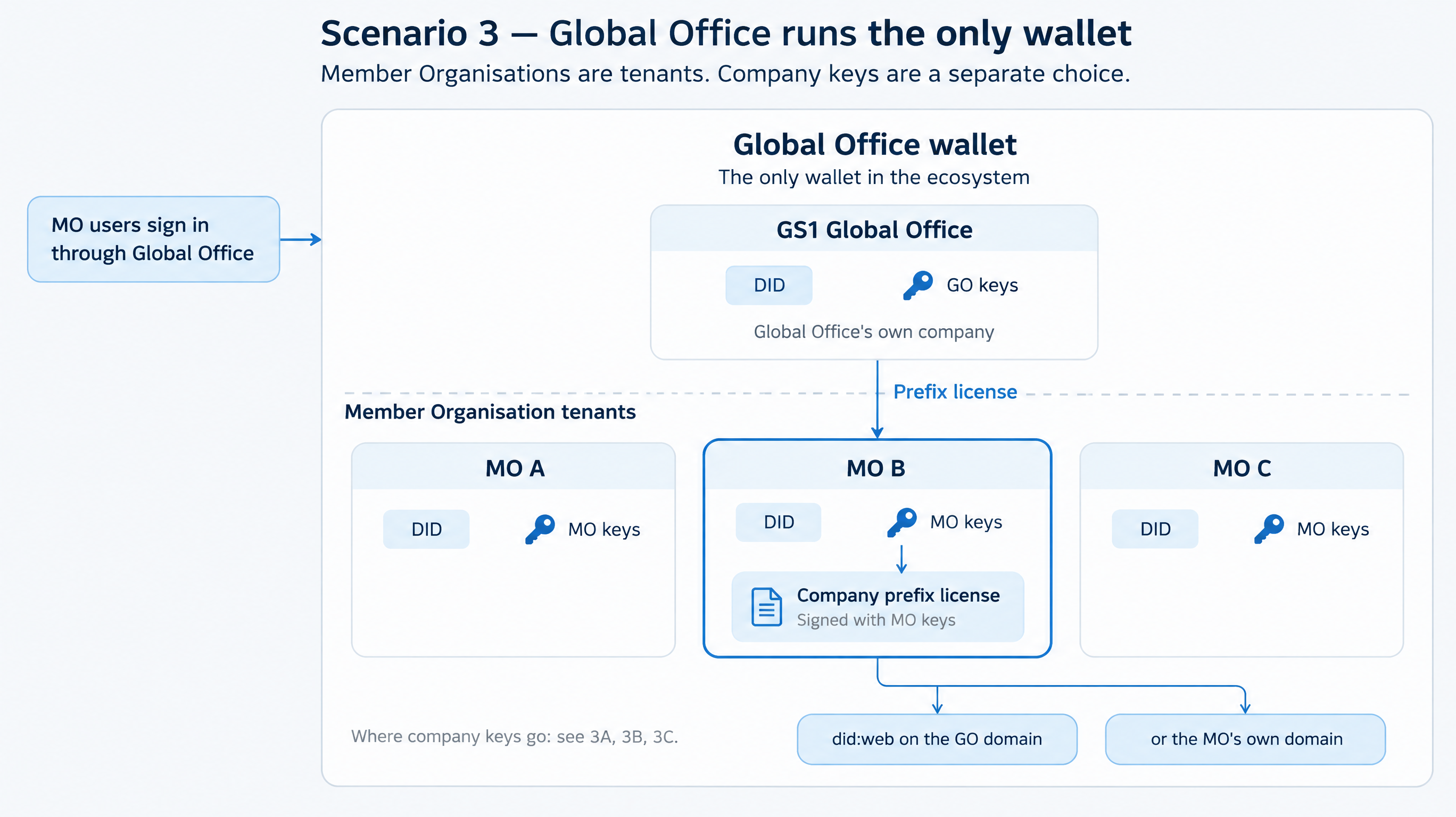
One wallet instance serves the whole ecosystem. Member Organisation DIDs and private keys are created and stored in the Global Office wallet. Global Office is the operator. Each Member Organisation remains the authority for its own DID.
Up to the company prefix, issuance works as in scenario 2 with the roles exchanged. Global Office hosts Member Organisations the way a Member Organisation hosts its companies:
- Global Office issues the prefix license. Both parties’ keys are in the Global Office wallet.
- The Member Organisation issues the company prefix license from its tenant in that same wallet.
- The Member Organisation signs in through Global Office single sign-on.
- The Member Organisation can publish
did:webon a Global Office path, or on its own domain, as described above.
A Member Organisation can also create identifiers for its member companies in this same wallet. Scenarios 3A, 3B, and 3C differ in whether those companies have keys here, and in whose account the keys sit.
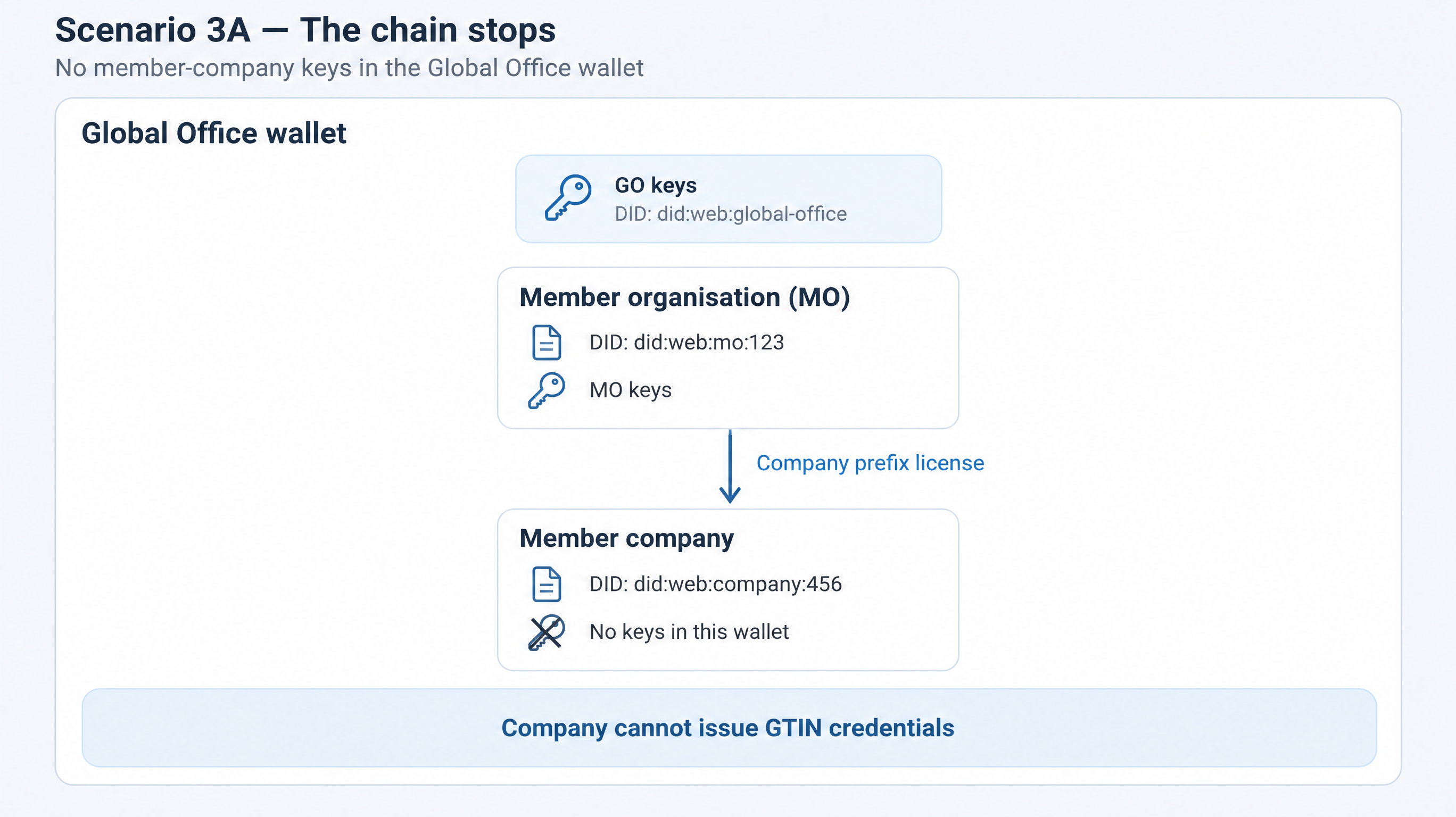
Scenario 3A — The chain stops at the company prefix
Member-company keys are not stored in the Global Office wallet yet. The chain this wallet produces ends at the company prefix license. GTIN credentials come later, when the company has a key in 3B, in scenario 2, or in its own wallet.
Use this when the goal is to digitise prefix and company-prefix licenses, and companies do not yet issue GTIN credentials.
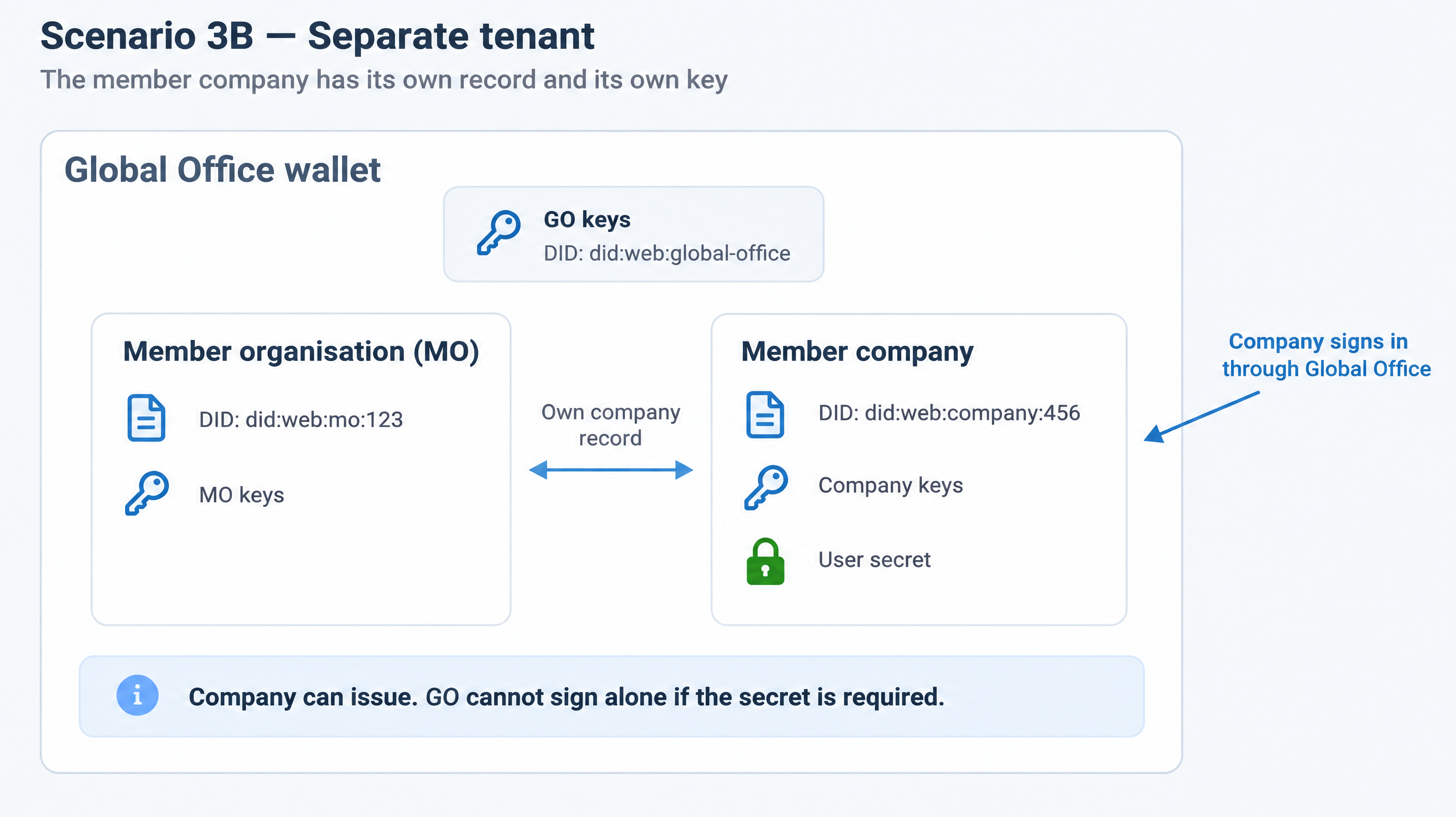
Scenario 3B — Companies are separate tenants
This is scenario 2 with Global Office as the operator. Each member company is its own company in the wallet, with its own DID and keys, separate from the Member Organisation’s account.
People at the member company reach this wallet in the way described in scenario 2: through Global Office sign-on, or through screens that call the wallet API. With a user secret, the company keeps the second factor, and the private key in this wallet signs when the company provides that file. Without a user secret, the company authorises Global Office to use the key when the company asks.
This is the separated option when there is only one wallet in the ecosystem. The company keeps its own tenant, and a user secret keeps control of the private key with the company.
Scenario 3C — The Member Organisation holds the company keys
The Member Organisation creates the member company’s DIDs and keys inside the Member Organisation’s own account in the Global Office wallet. There is no separate company login.
In scenarios 2 and 3B, a user secret stays with the company. The operator runs the wallet, and the private key signs when the company provides that second factor.
Scenario 3C is the one setup where a user secret does not keep that separation. The company has no login, so it does not present the file itself. To protect those keys with a user secret, the company would give the file to the Member Organisation, and the Member Organisation would present it on the Global Office wallet. Control of the private key and custody of the wallet then sit together, even though a user secret is in use.
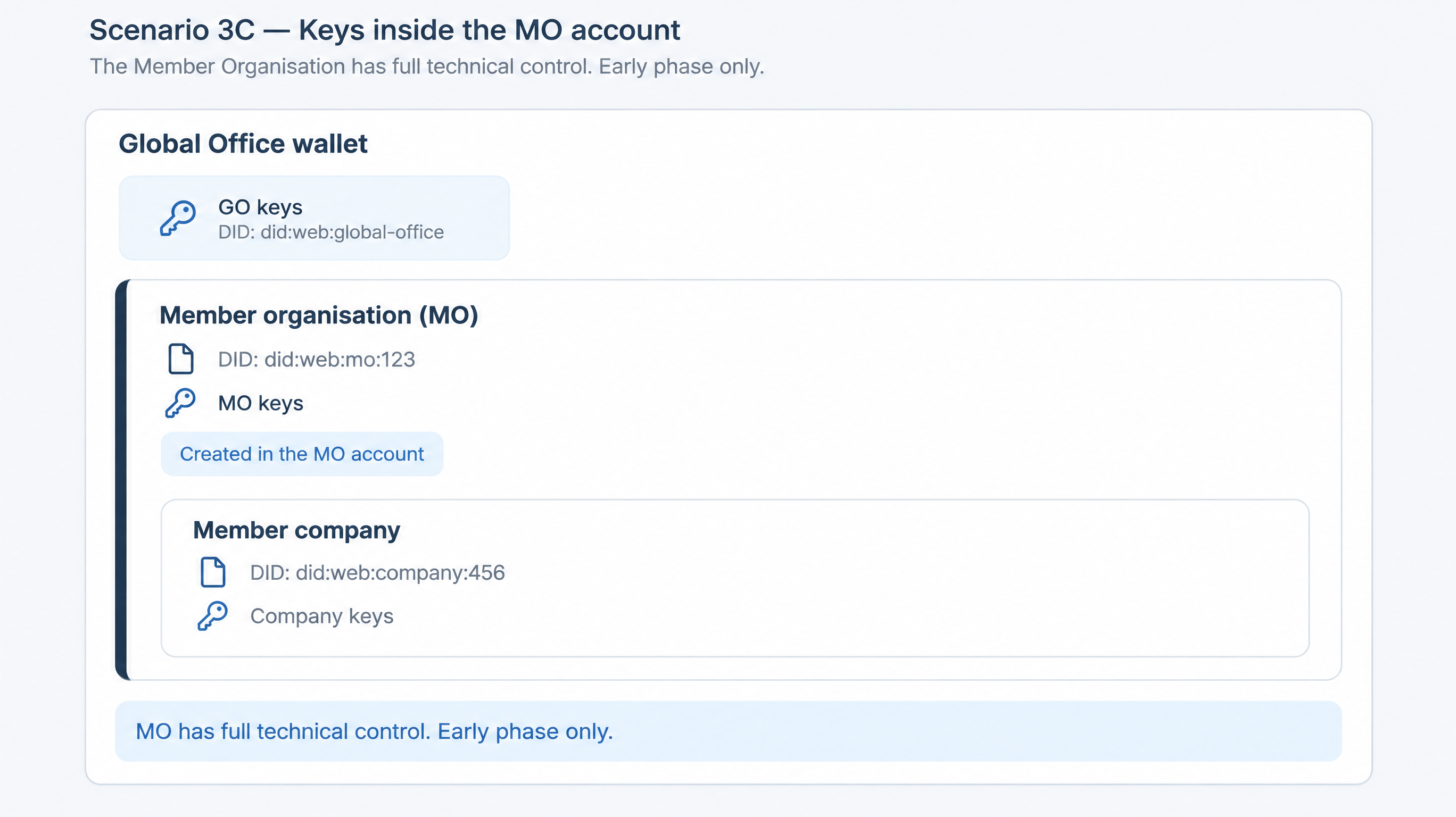
Comparing the scenarios
The license chain is the same in every row. Read across for who can actually sign.
| Scenario | Who operates the wallet | GO keys | MO keys | MC keys | MC can issue GTIN credentials |
|---|---|---|---|---|---|
| 1 — Own wallets | GO, each MO, and each MC | GO’s wallet | That MO’s wallet | That MC’s wallet | Yes. The company signs in its own wallet. |
| 2 — MO hosts companies | GO, and each MO for its companies | GO’s wallet | That MO’s wallet | MO wallet, in the company’s own tenant | Yes. The company uses the wallet through the MO. A user secret is the company’s second factor. |
| 3A — Licence chain only | GO | GO’s wallet | GO’s wallet, MO tenant | Not in this wallet | No. The chain ends at the company prefix license. |
| 3B — Company tenants on the GO wallet | GO | GO’s wallet | GO’s wallet, MO tenant | GO’s wallet, company tenant | Yes. Company users reach this wallet. A user secret is the company’s second factor. |
| 3C — MO holds company keys | GO | GO’s wallet | GO’s wallet, inside the MO account, together with the company keys | Inside the MO account | The MO signs for the company. Early phase. A user secret would be handed to the MO and presented on the GO wallet. |
What stays the same
- Each party that issues has its own DID, even when the keys are stored in someone else’s wallet.
- A prefix license is signed by Global Office. A company prefix license is signed by the Member Organisation. A GTIN credential is signed by the member company. Scenario 3A produces the chain up to the company prefix license. Scenario 3C produces a GTIN credential from keys that sit in the Member Organisation’s account.
- Team approval inside one organisation still works: several people can be required before that organisation’s key signs. See key management.
- Moving a
did:webidentifier onto the organisation’s own domain does not move the wallet.